This is an earlier version. The current manual is v7.5.0.
2 Initial Setup
2.1 Permissions Models
Each organization that uses MOST™ chooses a permissions model that determines what user roles are possible. If you are unsure which permissions model your organization uses you can ask via email. All NextStep integrated accounts use the CompliaTrac model. In both permissions models there are collections of actions that can be given or withheld from individual users as follows:
Permissions to work with audits
Permissions to manage questions and question sets (question admin)
Permissions to manage user accounts (user admin)
Permissions to manage persons and tags (list admin)
Permissions to perform organization-wide reporting (report admin)
Permissions to view the activity log and run the tamper report (log admin)
Permissions to fill in the policy documents’ values and choose their chapters (policy admin)
2.1.1 Traditional Permissions Model
This model is useful for organizations who want a few folks who are users of the application to manage accounts and have full access within their organization.
Organization admin can: audit, manage questions, manage user accounts, manage lists, access all reports, view the activity log, fill in the policy documents, unlock and unarchive audits
Auditing users can: audit (and can be given or denied additional permissions)
2.1.2 CompliaTrac Permissions Model
This model is useful for organizations who want a separation of powers between those who manage accounts and those who do the auditing.
User admin can: manage user accounts but cannot work with audits (and can be given or denied any additional privilege--except for the ability to audit)
Auditing user can: audit but cannot manage user accounts (and can be given or denied any additional privilege--except for the ability to manage accounts)
Additional details of how access is granted or denied according to each permissions model is embedded in each section.
2.2 Person Roles and Tag Types
Each organization can establish person roles and tag types to customize the auditing and reporting process. Adding person roles and tag types has a significant impact on the interface and so is performed by a MOST™ system administrator at the time an organization begins using the application. To make subsequent changes to these values send your request to help@mostaccess.com.
2.2.1 Person Roles
The application maintains a list of people who are referenced in the system. People in the list may include users of the system, clients, therapists, supervisors, etc. These different categories of people are what MOST™ refers to as “person roles”. The “reviewer” role indicates a user of the system who will be performing audits. This role is non-configurable. Other roles can be created as needed. A person can be assigned as many roles as apply to them which will determine which lists they appear in. For each person role that is added to the system the following changes occur:
A button is added to the top menu of the person listing screen for managing groups of that role.
A checkbox is added when modifying a person to allow them to be designated as filling the specified role.
The role is included as an option for specifying an audit subject.
The role is listed as an option for “Advanced Filters” on the audit listing screen.
The role is listed as a potential filter for many reports.
Each person role can be designated as required as an audit subject. This would be unusual, however. For example, designating “Client” as required would force every audit to include at least one client. If the specified role (e.g., “client”) contains PHI then this also can be specified. Many reports include options for hiding values so-designated in the case a report is to be used more widely.
2.2.2 Tag Types
Tags are used as audit subjects. Tag types represent categories for tags. Some examples of tag types are: location, program, foster home, etc. The “location” tag type is fixed/required, but other tag types are configurable. The more tag types that are specified, the more options become available when auditing and reporting. For example, if every audit specifies a location and a program then results can be filtered using either or both of these categories.
For each tag type that is added to the system the following changes occur:
A button is added to the “Audit Tags” group on the Menu screen.
The tag type is included as an option for specifying an audit subject.
The tag type is listed as an option for “Advanced Filters” on the audit listing screen.
The tag type is listed as a potential filter for many reports.
As with person roles each tag type can be designated as required as an audit subject. They can also be designated as containing PHI. Tag types provide an additional option of being user-editable. Doing so would allow an auditor to add new tags even if they don’t exist in the drop-down list.
2.2.3 An Example
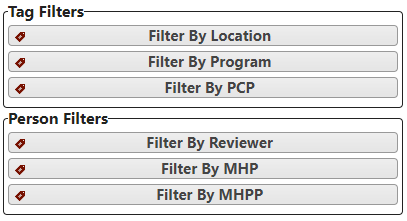
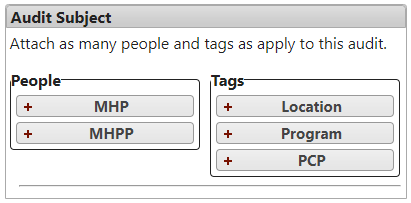
Suppose an organization uses these person roles: Reviewer, MHP, MHPP. And they provide these tag types: Locations, Programs, PCPs. These screenshots provide examples of some ways the MOST™ interface is affected:
Report Filters
When Creating an Audit