8 Reports Screen
All reports are produced as PDF documents, which your browser displays (or a PDF reader such as Adobe Reader, if your computer is set up to use one). From there you can save a report to disk, print, search contents, zoom, etc. A couple of the reports are optionally available as CSV documents.
To visit the Reports screen:
- Click on the Reports link (
 )
)
8.1 Reporting Permissions
Typical users can run “Audit Detail” reports and “Audit Listing” reports. However, they can only see reports on audits to which they have been granted access (creator, reviewer, or manager).
Organization administrators (in the traditional permission model) and reporting admins can run reports for any audit and have access to all types of reports documented below.
8.2 Common Themes Among the Reports
Report Parameters—Although the report types are fixed, each report provides a number of options for customization of the report for various purposes. Report parameter values are remembered to facilitate incremental tweaking of parameters to produce the desired result. Each report provides a Reset Params button that can be used to restore parameters to their default values.
Risk Analysis—Reports that have the term “risk” in the name can optionally provide risk analysis based on an acceptable compliance rate you provide. To measure risk you will need to have specified fee values in ribbon headers. Suppose a compliance rate below 90% is considered to trigger risk of recoupment. If that value is given as a report parameter then the report will determine the fees that are in danger of recoupment based on each question set involved in the report. The fee values are set by the organization for each question set.
Filters—Filters that are available differ from report to report. Filters are used to restrict or reduce the number of results and so when multiple are applied they use an implied logical AND. Some of the available filters are:
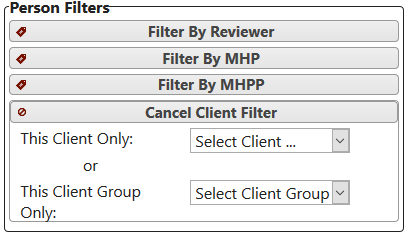
- Tag Filters and Person Filters: allow results to be restricted to matching a particular tag, tag group, person role, or person role group. Multiple filters can be activated at the same time. The form below shows the drop-down lists that are provided when a filter is activated.
Date Range: include results within the specified date range.
Question Set Type: show results only for question sets that have the specified type (determined by the organization on the Question Sets screen).
Completion: show results for completed or incomplete audits only.
Segmenting Results—Several reports allow for segmenting results by a particular tag type (e.g., Location) or a person role (e.g., Reviewer or Client) so that results for all relevant entries (e.g., locations, reviewers, clients) can be separated in a single report.
Including/Omitting Unanswered Questions—If an audit has not been completed the reporting queries can be instructed to ignore those questions in the reports (default behavior). Alternatively, unanswered questions can be included, in which case, the answers are assumed to be “no”.
Question Set vs. Question Set Type vs. Standard—Some reports allow results to be viewed for a single question set, or for all question sets of a particular type, or for all question sets based on a given standard. This provides significant flexibility in summary reports.
Summary Headers—Some reports allow entry of summary text to be placed at the top of a report. The summary text is not saved, so if the text is needed for multiple report runs then it should be saved in an external document.
Hiding Audit Names—Reports that display audit names allow those names to be hidden when the report is run. The purpose for this feature is because it is common for audits to be named with a chart number. Omitting the audit name allows the report to be generated without displaying any protected medical information.
Versions of a Standard—Reports never ask you to choose a version of a standard. A report on a standard covers every version of it, and a report on a question set covers it before and after it moved to a new version, so a report that spans a change (some organizations report a whole year) stays whole. See Question Sets and Versions of a Standard.
Hiding Subjects Containing PHI—Reports that display audit subjects (people or tags) can optionally hide those values if the specified tag type or person role has been designated as containing PHI. Clicking on the question-mark icon will display a list of tag types and person roles in use by your organization along with whether or not each has been designated as possibly containing PHI. See section Person Roles and Tag Types for additional information.
8.3 Audit Detail Report / Multi Audit Detail Report
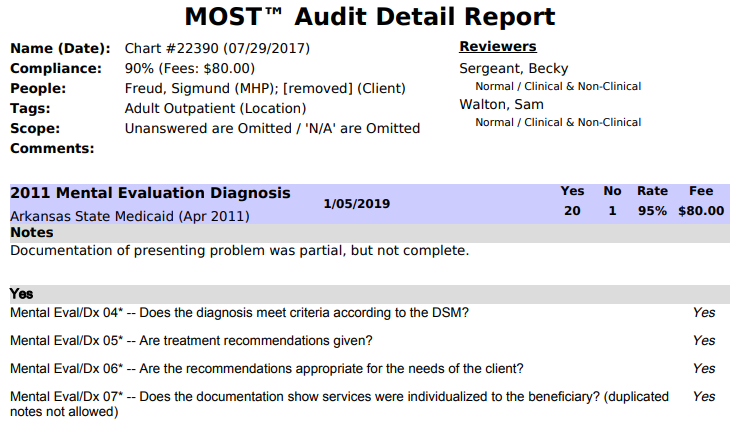
This report lists all questions within an audit grouped by answer. This report identifies exact problem areas within a single audit. If an audit is based on multiple question sets then a summary of the results is given. Also, if an acceptable compliance rate is given then problems are highlighted with relevant monetary figures attached (if fees have been used in ribbons). This report can be run in two ways:
1. The Audit Detail Report produces results for a single audit.
- Required parameters: audit, date range.(The date range is used to restrict the size of drop-down list to include only audits performed in that range.)
2. The Multiple Audit Detail Report produces the report for multiple audits at a time. Each detail report can be lengthy, so it is advisable to apply filters appropriately when using this option.
- Required parameters: none. (Though application of filters is strongly advised! If no filters are provided the size of the report can be enormous.)
NOTE: Both forms of the details reports allow fee data to be suppressed via a checkbox.
Partial Audit Detail Report
8.4 Question Set Detail Report
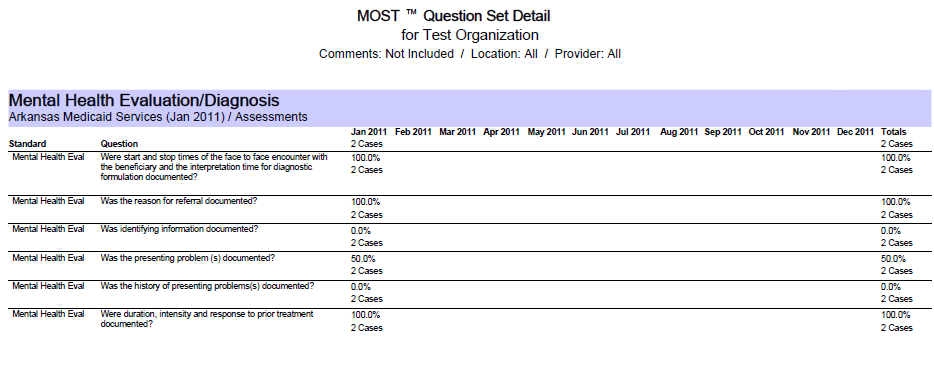
This report provides a monthly snapshot of how an organization (or location or provider) is doing on a per question basis. It shows each question in the question set broken down by number of cases that included yes or no answers per month.
Required parameters: question set or question set type or standard, term, start month, and number of months.
The option of including comments on a per-question basis can provide specific insights to problem areas.
The term parameter can be set to either Week or Month.
When set to Month (default) results are collected for each month in the date range.
Regardless of day of month entered in Start Month, the report defaults to first day of month (example: start date of 3/15/10 will show 3/1/10-2/28/11).
Number of Months maximum is 12 (default) and minimum is 1.
When set to Week results are collected for each week in the date range.
The range for the first week starts on the exact date you specify.
Number of Weeks maximum is 12 (default) and minimum is 1.
A summary chart showing percentage compliance for each month is also included.
Partial Question Set Detail Report
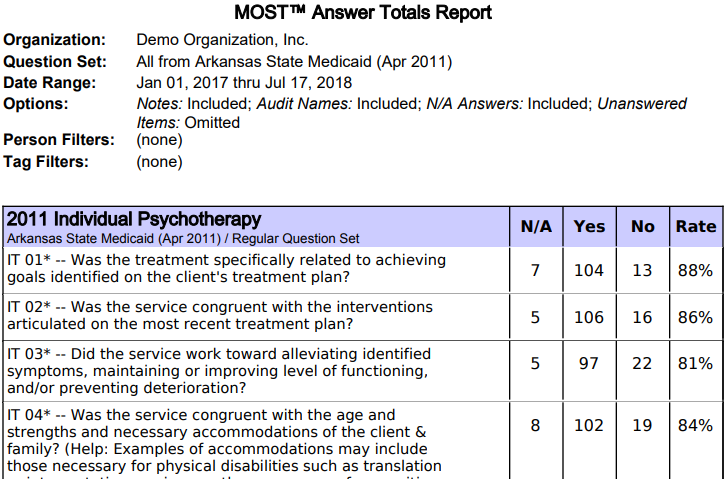
8.5 Answer Totals Report
The purpose of this report is to provide a concise view of compliance for individual questions. It is similar to the Question Set Detail described above except that totals are given for any arbitrary date range rather than grouped by month to show a pattern.
Required Parameters: question set or question set type or standard, start date, and stop date.
This report is available in both PDF and CSV format.
Partial Answer Totals Report
8.6 Risk Detail Report
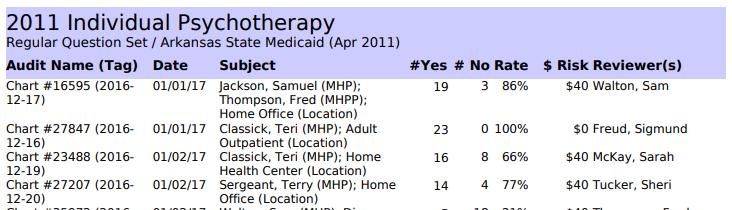
The purpose of this report is to show on a per-audit basis what recoupment risks exist. The monetary data is extracted from the fee value stored with each question set. Set a target compliance rate, say 90%, and the report flags services falling below it as at risk for recoupment: compliance stops being a percentage and becomes a figure your finance director can act on. These figures depend on auditors entering fees faithfully; MOST™ reports what has been recorded in it and does not verify billing.
Required Parameters: question set or question set type or standard, start date, and stop date.
This report is grouped by question set (or keyword or section if a single question set is selected) and displays number of yes and no answers along with a compliance rate. In addition a risk value is specified based on the provided acceptable compliance rate.
Partial Risk Detail Report (cutoff at 90% compliance)
8.7 Question Set Summary Report
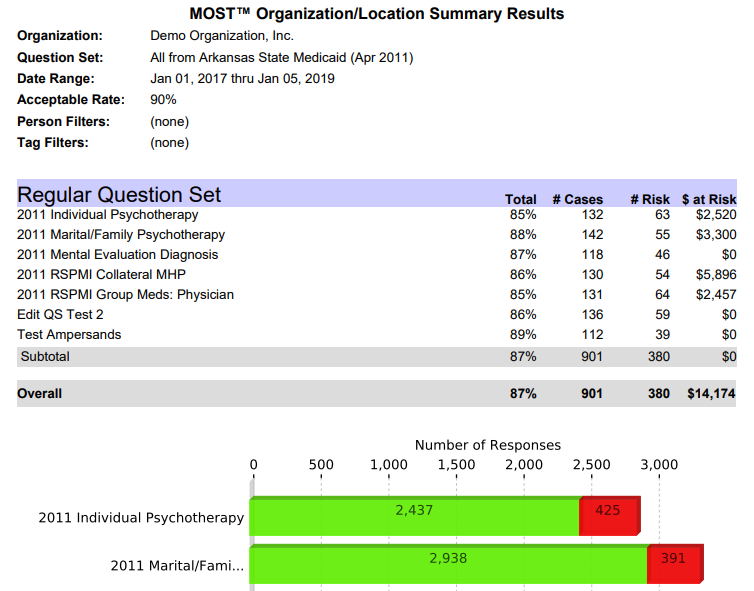
The purpose of this report is to provide compliance rate data across a question set, a type of question set or an entire standard. If an acceptable compliance rate is provided then monetary risk data is also provided.
Required Parameters: question set or question set type or standard, start date, and stop date.
Grouping of results is dependent upon whether a single question set has been selected or not. If the report covers only a single question set then categories are based on keywords (or sections in the case of custom-only question sets). If the report is based on a question set type or an entire standard then results are grouped by question set.
The bottom of the report shows a bar chart that identifies the number of responses for each question set/keyword/section, broken down by yes (green)/ no (red) answers.
A single question may be represented more than once in the summary totals because there may be more than one keyword associated with a question. Therefore, if you sum the total number of questions in each keyword category you may obtain a sum greater than the total number of questions answered. The percentages per keyword, however, will be meaningful.
Partial Question Set Summary Report
8.8 Audit Listing Report
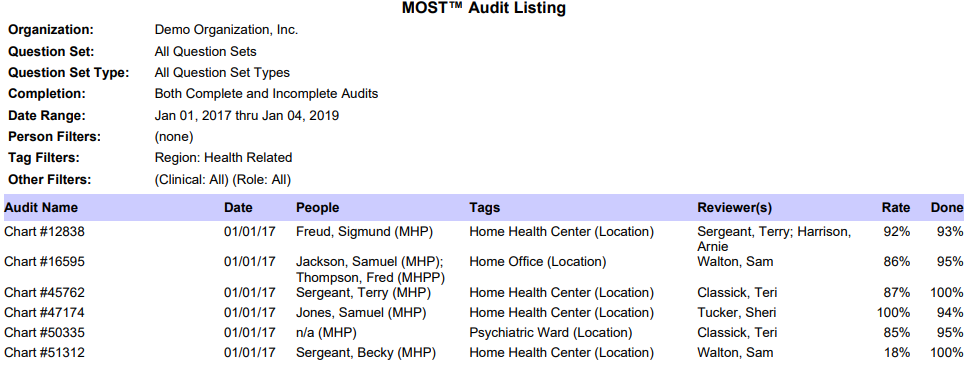
The purpose of this report is to list audits in the database. A wide variety of filters are provided so that lists can be customized. Among other things, this report can be used to identify what providers have been audited in a specified period of time. This report also allows segmented subreports to highlight audit coverage by a variety of factors.
Required Parameters: none.
This report is available in PDF and CSV formats.
Partial Audit Listing Report
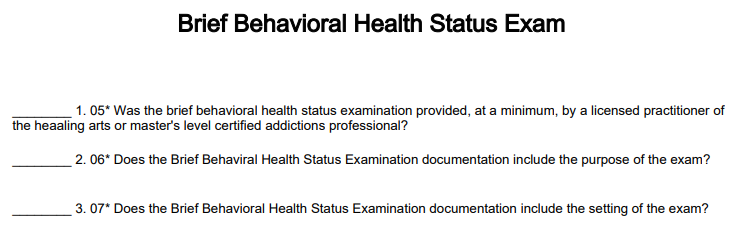
8.9 Printable Question Set Report
The purpose of this report is to produce a printable version of a question set. There are a variety of formatting options. If a printed question set is composed of custom questions it is possible to provide an organization logo to help@mostaccess.com to allow the questions to be identified to your organization.
- Required Parameters: question set.
Partial Audit Listing Report